The big migration
Samebase used to create your Cloudflare Worker and Convex project, store credentials for both, and repair them from a dashboard. All of that took more than 20,000 lines of code.
I'm replacing it with Alchemy. By November 1, 2026, I had moved 15 of my own apps. This page explains how Samebase works now and how to move yours.
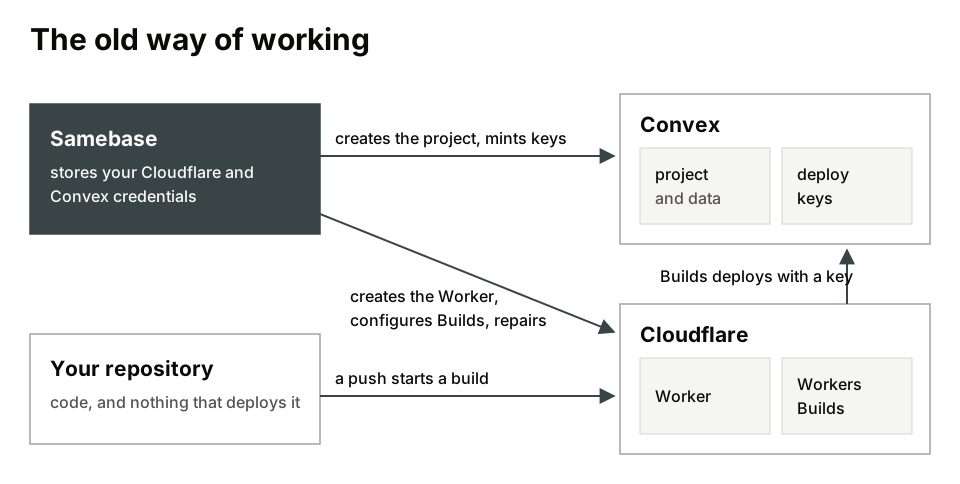
What Samebase is
Samebase is an opinionated way to use Alchemy. You describe your app in alchemy.run.ts, GitHub
Actions deploys it, and Samebase starts new apps, gives them Google sign-in, and monitors running
ones.
The main opinion is where the state lives. Alchemy keeps a record of what it deployed, and Samebase
puts that record in Convex, in a project called alchemy-state-store on your team.
That choice lets you connect with OAuth. A Convex OAuth token has no expiry date, so one click gives you one token: Samebase reads your state with it, and your repository deploys with it. A new app needs nothing pasted. Alchemy's own remote store runs on Cloudflare, where an OAuth token lasts one hour, so your CI needs a Cloudflare API token that you create yourself.
You also get Convex by default: a database, functions, site hosting, and a separate deployment for
each pull request. Cloudflare stays available. Declare a Worker in your stack and add
CLOUDFLARE_API_TOKEN and CLOUDFLARE_ACCOUNT_ID to your repository. Ten of my 15 apps work this
way.
Two costs come with this:
- The token is team-wide. Anyone who can push a branch to your repository can reach it from a preview run. Pull requests from forks get no preview and no token.
- Alchemy 2 is in beta. Betas break things, and the repositories of a team share one state store. Upgrade them together, on the same day.
How it works
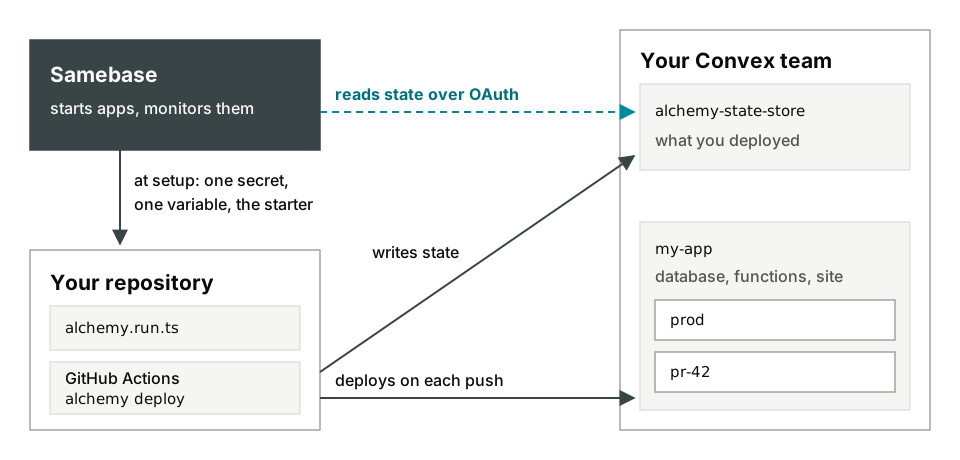
- You connect GitHub and Convex to Samebase.
- You create an app. Samebase creates the repository from the
starter and writes two values into it: the secret
CONVEX_ACCESS_TOKENand the variableCONVEX_TEAM_ID. - That first push starts GitHub Actions. Alchemy creates the Convex project and the production deployment, then uploads the site. My test app went live about 90 seconds after I clicked create.
- Alchemy records each resource in the state store. Samebase reads the store and shows you the stack.
- Each pull request gets a deployment named
pr-<number>and a comment with its URL. Closing the pull request deletes that deployment.
After setup, Samebase changes nothing in your accounts unless you ask it to remove the app. Deploys run in your repository, and you fix a failed deploy there: read the Actions log, then change the stack yourself or with your agent.
To leave Samebase, replace CONVEX_ACCESS_TOKEN with a Convex team access token, then remove the
repository from Samebase and keep its resources. Your app keeps deploying. Google sign-in through
auth.samebase.com stops, so connect your own first.
New App still defaults to the old setup. To try this flow, choose Set up by GitHub Actions in the repository.
Do you have to move?
Your app keeps running if you do nothing. Its Worker and Convex project sit in your accounts, and Workers Builds keeps deploying. You lose Samebase's status and repair tools for that app when I remove the old setup. I'll post the date in the changelog.
Move a Worker site
Ten of my apps were static sites on Workers Builds. spiro is a finished example with pnpm, and planable-logo with npm.
-
Install the packages at these exact versions, and add
.alchemyto.gitignore:pnpm add -D alchemy@2.0.0-beta.84 @alchemy.run/cloudflare@2.0.0-beta.84 \ @samebase/alchemy-convex@0.20.0 effect@4.0.5 @effect/platform-node@4.0.5A fresh install picks newer Effect packages, and Alchemy fails to load, so pin them. With pnpm, set
packageManagerinpackage.jsonand add this topnpm-workspace.yaml. With npm, put the two pins underoverridesinpackage.json.allowBuilds: esbuild: true workerd: true overrides: "@effect/platform-node-shared": 4.0.5 "@effect/sql-d1": 4.0.5 -
Add
alchemy.run.ts. Name the stack after your GitHubowner/repo, because Samebase finds it by that name. Give the production Worker its current name, and copy the variables, bindings, and asset settings fromwrangler.jsonc. Alchemy uploads what the stack declares and drops the rest.import * as Cloudflare from "@alchemy.run/cloudflare"; import * as Convex from "@samebase/alchemy-convex"; import * as Alchemy from "alchemy"; import * as Effect from "effect/Effect"; export default Alchemy.Stack( "you/my-site", { providers: Cloudflare.providers(), state: Convex.state(), }, Effect.gen(function* () { const { stage } = yield* Alchemy.Stack; const site = yield* Cloudflare.Worker("Site", { name: stage === "prod" ? "my-site" : `my-site-${stage}`, assets: { directory: "./dist", notFoundHandling: "none" }, compatibility: { date: "2026-08-16" }, workersDev: { enabled: true, previewsEnabled: true }, }).pipe(Alchemy.RemovalPolicy.retain(stage === "prod")); return { url: site.url }; }), ); -
Add
.github/workflows/alchemy.yml, with your default branch and your build command:name: Alchemy on: push: { branches: [main] } pull_request: { types: [opened, synchronize, reopened, closed] } workflow_dispatch: { inputs: { adopt: { type: boolean, default: false } } } permissions: { contents: read, pull-requests: write } jobs: alchemy: uses: samebase/samebase/.github/workflows/alchemy-deploy.yml@1be01142b0fdc03c3f521b2077fc9381abfd2020 with: { adopt: "${{ inputs.adopt == true }}", build: pnpm run build, detect-drift: true } secrets: CONVEX_ACCESS_TOKEN: ${{ secrets.CONVEX_ACCESS_TOKEN }} CLOUDFLARE_API_TOKEN: ${{ secrets.CLOUDFLARE_API_TOKEN }} CLOUDFLARE_ACCOUNT_ID: ${{ secrets.CLOUDFLARE_ACCOUNT_ID }}The shared workflow runs one deploy per stage and supports npm and pnpm. With another package manager, copy the file and change the install step. Your Workers Builds variables don't carry over, so put any that your build needs in the
buildinput. -
Set the three secrets with
gh secret set.CONVEX_ACCESS_TOKENis a team access token from your Convex team settings. You need it even without a Convex app, because your state lives there. My Cloudflare tokens hold Workers Scripts Write and Workers CI Write. -
Export the same three values in your shell and plan before you merge. The adopt run deploys as soon as you start it, so read the plan here.
pnpm exec alchemy plan --stage prod --adopt --no-input --env-file /dev/nullYou want
Plan: 1 to adopted. Stop on a create, a replace, or a delete. -
Turn off Workers Builds with
cf, Cloudflare's CLI. The Worker keeps running.cf workers scripts search --name my-site # its id is the tag cf builds workers delete <tag> --force cf builds triggers list --external-script-id <tag> # must print [] -
Open a pull request and merge it. The push run fails with
OwnedBySomeoneElseand changes nothing, because the stack doesn't own the Worker yet. -
Adopt the Worker, once, from your default branch:
gh workflow run alchemy.yml -f adopt=true -
Change a file your site serves and merge it. You want
Plan: 1 to updateand your change live. Then removewrangler.jsonc,wrangler, and the old deploy scripts. -
If the repository is in Samebase, open its Settings and remove the old Worker from Connections. Samebase deletes its own record, and the Worker keeps running.
Move a Convex app
Five of my apps have Convex backends, and they kept their projects and data.
score-four is the worked example:
PR 17 moves production and
PR 18 adds previews. It also moves the site
from a Worker to convex-hosting, so its address
changes to <name>.convex.site. Follow the Worker steps with these changes.
-
Export first. Do this before you touch anything, and write down the row count of each table.
env -u CONVEX_DEPLOY_KEY npx convex export --deployment <team>:<project>:prod \ --include-file-storage --path before.zip -
Copy the stack and its setup from PR 17:
@alchemy.run/github,convex-hostinginconvex/convex.config.ts, and adeployscript that runsconvex-hosting deploy. Leave the starter'salchemy.run.tsalone. It marks its projectRemovalPolicy.destroy(), because a new app has nothing to lose. PassslugtoConvex.Project. Withslug, Alchemy can't create or rename a project, and a stack destroy leaves it in Convex. -
Leave
pull_requestout of the workflow for now. A preview reads the project from production's state, so it fails until the adopt finishes. Add the trigger in a follow-up pull request. With Convex Auth, generate a newJWT_PRIVATE_KEYandJWKSfor previews and set them as project defaults. Keep production's keys out of it. -
Expect a different plan:
1 to create, 1 to adopted. The create is[Deployment], which reuses your production deployment and runs yourdeployscript. Stop on anything else. -
Delete Workers Builds' deploy keys along with Builds. Builds runs your
deployscript with a production key, so after the move a live Builds link pushes to production from Cloudflare.npx convex deployment token delete "<name>" --deployment <production> -
Export again after the adopt and compare row counts before you sign in. Your own testing adds rows.
-
Delete the old Worker once nobody needs its address. It keeps serving its last build.
Traps
- Read the plan line in each run.
Plan: no changesmeans the green run deployed nothing. - Alchemy logs "create" during an adopt.
Cloudflare Worker create: uploading scriptappeared on Workers it reused. Check thatcreated_onfromcf workers scripts searchhasn't changed. - Regions change the URL. A deployment in Europe answers on
<name>.eu-west-1.convex.site. The short host returns a bare 404 that looks like an outage. Copy the URL from the run's{ url }line. @samebase/alchemy-convexhidesCONVEX_*variables from yourdeployscript. Of those, the script getsCONVEX_DEPLOY_KEYalone, so a check inside it has to read that key.- Custom domains stay outside the stack.
tsx.mdkept working through its move, butalchemy.run.tsdoesn't declare it. Attach it again by hand if you rebuild the Worker. - Alchemy adopts R2 buckets with no
--adopt. It also clears lifecycle rules you left out and destroys by default. Leave a bucket out of the stack unless a Worker binds it, and retain it if you add it.
One app stays on the old setup. It holds 152,011 documents, and I want a second review of the cutover before I run it.